In the fast-paced world of e-commerce, customers add items to their carts with enthusiasm, only to often leave without completing their purchase. This phenomenon, known as cart abandonment, is a significant challenge for online businesses, with an average rate hovering around 70-80% across industries. For WooCommerce store owners, every abandoned cart represents lost revenue and a missed opportunity. automated cart recovery solution automated cart recovery solution
But what if you could turn a significant portion of these lost sales into completed transactions? That's precisely where the power of an abandoned cart email comes into play. These strategically timed and crafted messages are your most potent weapon in the battle against lost revenue, gently nudging hesitant shoppers back to their carts.
This comprehensive guide for 2025 will equip you with everything you need to know about implementing a highly effective abandoned cart email strategy. From understanding the psychology behind abandonment to crafting persuasive email sequences and leveraging the best tools, we'll dive deep into abandoned cart email best practices to help you recover more sales than ever before.
What is an Abandoned Cart Email and Why Do You Need It?
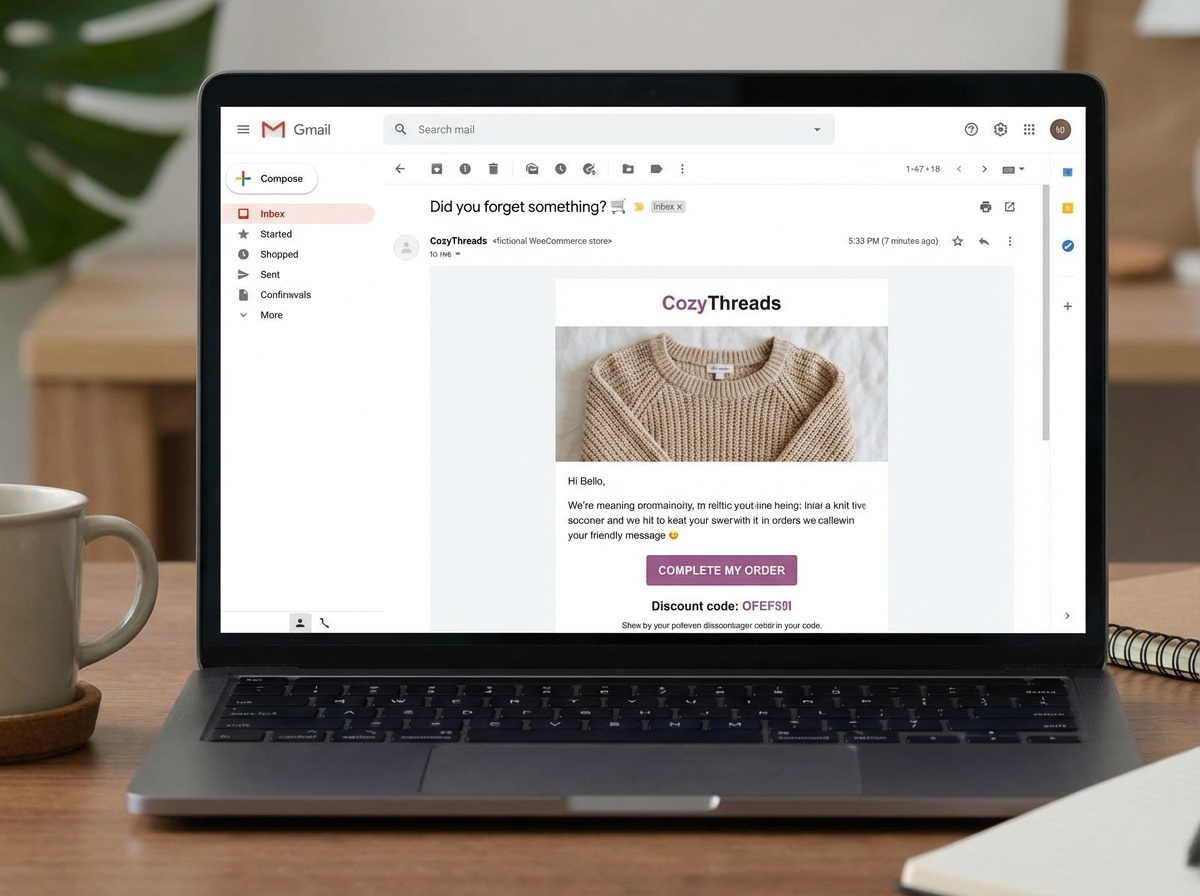
An abandoned cart email is an automated follow-up email sent to a customer who has added items to their shopping cart on your website but left before completing the purchase. It serves as a polite reminder, an offer of assistance, or even a last-minute incentive to encourage them to return and finalize their order.
Why are these emails so crucial for your WooCommerce store in 2025? Here’s why:
- Direct Revenue Recovery: The most obvious benefit. Abandoned cart emails directly contribute to recovering sales that would otherwise be lost. Studies show these emails can recover anywhere from 10% to 30% of abandoned carts, translating to substantial revenue boosts.
- High ROI: Compared to other marketing efforts, abandoned cart emails boast an incredibly high return on investment. The cost to send is minimal, but the potential for recovered sales is immense.
- Customer Engagement: It’s a touchpoint. Even if a purchase isn't completed immediately, these emails keep your brand top-of-mind and can foster goodwill by offering help.
- Insight into Customer Behavior: Analyzing open rates, click-through rates, and conversion rates of your cart recovery emails can provide valuable insights into why customers are abandoning carts in the first place, helping you optimize your checkout process.
- Personalization Opportunities: Since you know exactly what items were in their cart, you can tailor the email content, making it highly relevant and persuasive.

7 Explosive Abandoned Cart Email Best Practices for 2025
To truly maximize your ecommerce email recovery efforts, you need to go beyond just sending a single reminder. Implementing these best practices will elevate your strategy in 2025 and beyond.
1. Timely Follow-Ups: The Golden Window
Timing is paramount. Send your first abandoned cart email within 30-60 minutes of abandonment. This catches shoppers while their intent is still high and the products are fresh in their minds. A second email can follow after 24 hours, and a final one after 3-5 days.
- Email 1 (30-60 mins): Gentle reminder, "Did you forget something?"
- Email 2 (24 hours): Emphasize benefits, address common concerns, or offer social proof.
- Email 3 (3-5 days): Last chance, often with a small incentive.
2. Personalization is Power
Don't just list products; show the customer you know them. Use their name, remind them of the specific items they left behind (with images!), and tailor the messaging to their potential needs. If you have purchase history, suggest related items or highlight benefits relevant to their past behavior.
Scenario: Sarah's Boutique Success
Sarah, a WooCommerce store owner selling handmade jewelry, noticed her first abandoned cart email had a decent open rate but low conversions. She revamped her strategy to include images of the exact necklaces and rings the customer left behind, along with a personalized message like, "Hi [Customer Name], those [Product Name] earrings would perfectly complement your style!" Her conversion rate for the first email jumped by 8%.
3. Craft Compelling Subject Lines
Your subject line is the gatekeeper to your email's content. Make it clear, concise, and compelling. Use emojis sparingly for visual appeal, create a sense of urgency, or ask a question.
- "Oops! Did you forget something?"
- "Your [Product Name] is waiting!"
- "Still interested? Complete your order for [Offer]!"
- "Your cart expires soon – don't miss out!"
4. Offer Strategic Incentives (But Don't Overdo It)
Sometimes, a small push is all that's needed. Consider offering a discount code (e.g., 10% off), free shipping, or a small free gift in your second or third abandoned cart email. Be careful not to offer discounts too early, as customers might learn to abandon carts intentionally to get a deal. A smart strategy is to vary the incentive based on cart value.
5. Optimize for Mobile First
Given that a significant portion of ecommerce traffic comes from mobile devices, your abandoned cart emails must be fully responsive and look great on any screen. Ensure buttons are tappable, text is readable, and images load quickly.
6. Clear Call-to-Action (CTA)
Make it incredibly easy for customers to return to their cart. Use a prominent, clear, and benefit-driven CTA button like "Complete Your Order," "Go to My Cart," or "Claim Your Discount."
7. Leverage Social Proof & Urgency
Incorporate elements of social proof, such as customer testimonials or star ratings for the products in their cart. Create a gentle sense of urgency by mentioning limited stock or that items are popular and might sell out.
Your Essential Abandoned Cart Email Checklist
-
Send First Email within 30-60 mins: Strike while the iron is hot.
-
Personalize Content: Use customer names and exact cart items.
-
Compelling Subject Lines: Grab attention immediately.
-
Clear & Concise Copy: Get to the point quickly.
-
Prominent CTA: Make it effortless to return.
-
Mobile Responsiveness: Ensure perfect display on all devices.
-
Strategic Incentives: Use wisely to convert.
-
Social Proof & Urgency: Build trust and prompt action.
-
A/B Test Everything: Optimize for continuous improvement.
Crafting Your High-Converting Abandoned Cart Email Sequence
A single abandoned cart email is a good start, but a well-designed sequence significantly boosts your cart recovery emails success rate. Here’s a typical, highly effective structure:
Email 1: The Gentle Reminder (30-60 minutes after abandonment)
Purpose: To remind the customer of their cart and offer easy access back.
- Subject Line: "Oops! Did you forget something?" or "Your [Product Name] is waiting for you!"
- Content:
- Friendly, non-pushy tone.
- Reiterate the items left in the cart (with images).
- Direct link back to their cart.
- Optional: Briefly mention a key benefit of purchasing.
Email 2: Overcoming Objections & Building Trust (24 hours after abandonment)
Purpose: To address common reasons for abandonment and build confidence.
- Subject Line: "Still thinking about those [Product Name]?" or "Don't miss out on your perfect items!"
- Content:
- Address potential concerns (e.g., shipping costs, product questions) by linking to FAQs or customer support.
- Showcase social proof: customer reviews, testimonials, best-seller badges.
- Highlight unique selling propositions (USPs): free shipping, easy returns, quality guarantee.
- Repeat the clear CTA to return to cart.
Email 3: The Last Chance & Incentive (3-5 days after abandonment)
Purpose: To create urgency and provide a final incentive to convert.
- Subject Line: "Your Cart Expires Soon! Here's 10% Off!" or "Last Chance for Your [Product Name]!"
- Content:
- Create urgency (e.g., "Items selling fast," "Discount expires in 24 hours").
- Introduce a strategic incentive (discount code, free shipping for a limited time).
- Reiterate the items and their benefits.
- Strong, urgent CTA.
- Link to customer support if they have questions.
Ready to Recover Lost Sales Effortlessly?
Implement smart, automated abandoned cart recovery directly within your WooCommerce store.
Leveraging the Right Tools for Seamless Cart Recovery
Manually tracking and sending **abandoned cart email** sequences is simply not scalable for any growing WooCommerce store. This is where dedicated plugins and tools become indispensable. They automate the entire process, ensuring timely delivery, personalization, and performance tracking.
WooCommerce Abandoned Cart Plugins vs. General Email Marketing Tools
While general email marketing platforms can integrate with WooCommerce, specialized abandoned cart plugins offer deeper integration, specific triggers, and tailored features that often lead to higher conversion rates. When looking for the best WooCommerce cart abandonment plugins for 2025, consider ease of use, customization options, reporting, and pricing.
| Feature | Dedicated Abandoned Cart Plugin (e.g., Geekplugin) | General Email Marketing Platform (e.g., Mailchimp) | Manual Recovery |
|---|---|---|---|
| WooCommerce Integration | Deep, native integration with cart data, user accounts, and checkout flow. | Requires setup via API or third-party connectors, sometimes limited data. | None; requires manual data extraction. |
| Ease of Setup & Use | Designed for WooCommerce users, intuitive setup for recovery sequences. | Requires more technical know-how to configure specific WooCommerce triggers. | Extremely high manual effort, prone to errors. |
| Personalization & Automation | Advanced personalization (product images, names) & multi-stage automation built-in. | Personalization is possible, but complex setup for specific cart details. | Limited, time-consuming personalization. |
| Reporting & Analytics | Detailed recovery analytics, revenue attributed to emails, conversion rates. | General email metrics; specific cart recovery attribution might be limited. | No automated reporting. |
| Cost-Effectiveness | Optimized for specific task; high ROI due to focused recovery. ⭐ Editor’s Choice: Cart Abandonment Recovery |
Often tiered pricing based on subscriber count, can be costly for large lists. | High labor cost, low scalability. |
Geekplugin: Your Ultimate WooCommerce Cart Recovery Partner
For WooCommerce stores, a specialized solution like Geekplugin offers unparalleled advantages. It seamlessly integrates with your store, automatically tracks abandoned carts, and allows you to set up highly personalized and automated recovery email sequences. With features designed specifically for WooCommerce, Geekplugin helps you implement all abandoned cart email best practices with minimal effort.
Discover more about how to stop abandonment with WooCommerce Abandoned Cart Strategies That Actually Convert.
Advanced Strategies for Maximum Ecommerce Email Recovery in 2026
Beyond the basics, several advanced techniques can significantly boost your ecommerce email recovery rates, ensuring your strategies remain cutting-edge for 2026.
A/B Testing Everything
Never assume what works. A/B test your subject lines, email copy, CTA buttons, timing of emails, and even the types of incentives offered. Small tweaks based on data can lead to substantial improvements over time. For example, test whether "Your cart is waiting!" performs better than "Did you forget something awesome?"
Cart Abandonment Segmentation
Not all abandoned carts are equal. Segment your abandoned cart emails based on:
- Cart Value: Offer higher incentives for high-value carts.
- Number of Items: Different messaging for single-item vs. multi-item carts.
- Customer History: Tailor messages for first-time abandoners vs. returning customers, or those who previously purchased a specific product type.
- Abandonment Stage: Did they abandon at the product page, cart, or checkout? This can inform your messaging. For more on this, check out our guide on Exit-Intent & Checkout Optimization to Stop WooCommerce Cart Abandonment.
Integrating with Exit-Intent Popups
Combine your email efforts with on-site strategies. An exit-intent popup can capture a visitor's attention right before they leave, offering a last-minute discount or a prompt to save their cart via email. This can prevent some abandonments before they even happen, making your email recovery efforts even more targeted.
Utilizing SMS & Push Notifications
For even higher engagement in 2026, consider adding SMS or browser push notifications to your recovery sequence, especially for the urgent "last chance" reminders. Always ensure you have explicit consent for these channels.
Technical Enhancement: Automatically Emptying Stale Carts
While recovering carts is paramount, managing stale, long-abandoned carts can sometimes clutter your database or user experience. For WooCommerce, you can add a simple function to your `functions.php` file to automatically empty carts that have been inactive for a certain period. This can help keep your store tidy. Always back up your site before adding custom code.
// Automatically empty WooCommerce cart after 60 minutes of inactivity
add_action( 'woocommerce_cart_loaded_from_session', 'geekplugin_empty_cart_after_inactivity' );
function geekplugin_empty_cart_after_inactivity() {
$inactive_time_limit = 3600; // 60 minutes in seconds

if ( ! is_admin() && ! defined( 'DOING_CRON' ) ) {
$last_cart_activity = WC()->session->get( 'last_cart_activity_timestamp' );

if ( ! $last_cart_activity ) {
WC()->session->set( 'last_cart_activity_timestamp', time() );
} else {
if ( ( time() - $last_cart_activity ) > $inactive_time_limit ) {
WC()->cart->empty_cart( true );
WC()->session->set( 'last_cart_activity_timestamp', time() ); // Reset timestamp
wc_add_notice( 'Your cart has been emptied due to inactivity. Please add items again.', 'notice' );
} else {
WC()->session->set( 'last_cart_activity_timestamp', time() ); // Update timestamp
}
}
}
}
This snippet adds a check on cart load. If the cart hasn't been active for 60 minutes, it's emptied, and a notice is displayed. Remember to test thoroughly!
Stop Losing Sales: Automate Your Abandoned Cart Emails!
Don't let valuable customers slip away. Geekplugin makes it incredibly easy to set up powerful, personalized abandoned cart email sequences that convert browsers into buyers.
Frequently Asked Questions About Abandoned Cart Emails
What is a good abandoned cart email open rate?
A good open rate for abandoned cart emails typically ranges from 40% to 50%, significantly higher than general marketing emails. This high engagement is due to the immediate relevance and intent of the shopper.
How many abandoned cart emails should I send?
Most experts recommend a sequence of 2-3 emails. The first within 30-60 minutes, the second after 24 hours, and the third after 3-5 days. Sending too many can annoy customers, while too few might miss opportunities.
Should I offer a discount in my abandoned cart emails?
It depends on your strategy. While a discount can be a powerful motivator, it's often best to save it for the second or third email in your sequence. Offering it too early might train customers to abandon carts to get a deal. Test different approaches to see what works for your audience and profit margins.
What's the best time to send the first abandoned cart email?
The optimal time for the first email is within 30-60 minutes after a customer abandons their cart. This ensures you catch them while their purchase intent is still fresh, maximizing the chance of immediate recovery.
Do abandoned cart emails actually work?
Absolutely. Abandoned cart emails are one of the most effective email marketing strategies, with studies showing they can recover between 10% and 30% of lost sales. They offer a direct line to re-engage highly interested customers and provide an exceptional ROI.
Conclusion
The abandoned cart email is not just a marketing tactic; it's an essential revenue recovery strategy for any WooCommerce store looking to thrive in 2025 and beyond. By understanding the psychology behind abandonment, implementing abandoned cart email best practices, and crafting compelling email sequences, you can significantly reduce lost sales and boost your bottom line.
Remember that success lies in personalization, timely follow-ups, and continuous optimization. Leverage specialized tools like Geekplugin to automate and streamline your efforts, allowing you to focus on growing your business while recovering valuable revenue effortlessly. Don't let those abandoned carts remain abandoned—turn them into completed sales with a powerful abandoned cart email strategy.
For comprehensive WooCommerce cart recovery, consider ⭐ Editor’s Choice: Cart Abandonment Recovery.
Stop Losing Sales. Start Recovering Today!
Get started with Geekplugin and transform your abandoned carts into successful orders.
Frequently Asked Questions
How effective is cart abandonment recovery?
Cart abandonment recovery can recover 10-30% of lost sales when implemented correctly with automated emails and exit-intent popups.
What is the best cart recovery plugin for WooCommerce?
Geekplugin is highly rated for its ease of use, built-in exit-intent popups, and affordable pricing starting at $7/month.
When should I send cart recovery emails?
Send the first email within 1 hour, the second at 24 hours, and the third at 3 days for optimal results.